
Meet llms.txt: The File That Sets Your AI Usage Expectations
llms.txt is a straightforward text file that outlines your website’s preferences and expectations for artificial intelligence usage. It is positioned at your root domain, serving as an explicit policy document that addresses how your site's content should be treated by AI technologies. This file details permissions and restrictions for AI training, inference, citation requirements, and data retention. It is intended to supplement, not replace, robots.txt. Write llms.txt so that it is understandable for humans and can be interpreted by machines. Keep it concise, versioned, and treat it as a living document that reflects ongoing consent and policy updates.
Why is this needed now? As AI agents increasingly access public content for their operations, site owners deserve a clear mechanism for communicating their expectations. llms.txt provides a robust reference for your policies regarding the utilization of AI technologies.
How robots.txt Works for Search Engine Crawlers and Why It Still Matters
robots.txt is the established file for guiding web crawlers on which content they can access and index. It resides at /robots.txt and uses user-agent identifiers, along with allow and disallow rules, to direct crawler behavior. Search engines and a variety of bots consult robots.txt before accessing your website. While not a legal contract, robots.txt is a universal standard widely respected by compliant bots.
Even as AI systems proliferate, robots.txt remains important. AI crawlers need to fetch pages to analyze or train on them. By defining what can be crawled, you control what is available to these agents. Use robots.txt as your first line of defense for dictating what is discoverable from the source.
llms.txt vs robots.txt: Practical Differences You Will Notice
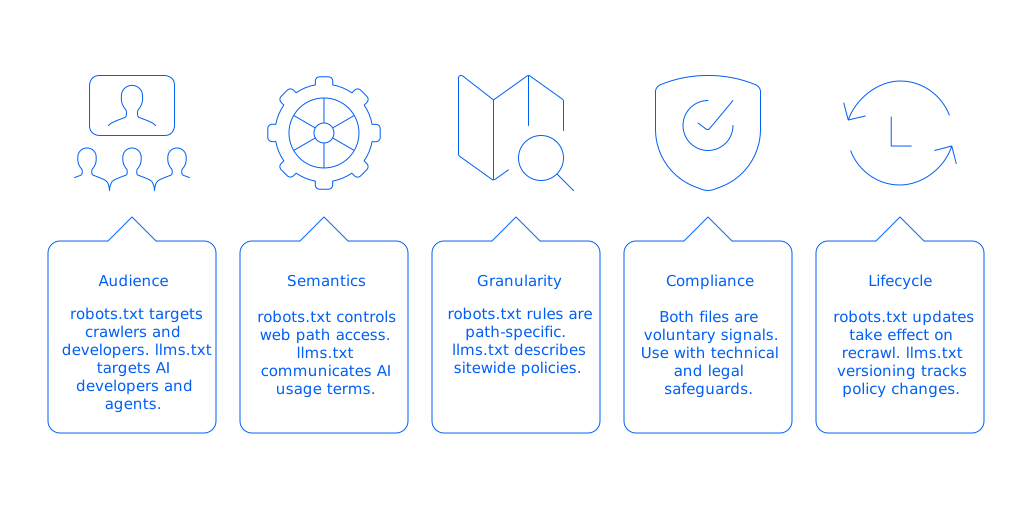
- Audience: robots.txt is aimed at crawlers and the developers of those crawlers. llms.txt provides instructions regarding the AI usage expected by model developers and indications that could potentially be interpreted by AI agents.
- Semantics: robots.txt addresses which web paths can be fetched. llms.txt communicates broader usage terms and preferences surrounding AI operations on your content.
- Granularity: robots.txt rules are path-specific, working on individual URLs. llms.txt can describe sitewide policies, with the flexibility to note exceptions for particular areas.
- Compliance: Both files act as voluntary signals. For best results, use them alongside robust technical and legal safeguards.
- Lifecycle: Updates to robots.txt take effect as bots recrawl your site. llms.txt, with its versioning, enables you to track and signal policy changes over time.
Use both files in tandem: robots.txt determines which areas are accessible, while llms.txt makes clear how permitted content may be used by AI systems.
Where to Place llms.txt and robots.txt, and How Crawlers Find Them
Both /robots.txt and /llms.txt should be placed at the root directory of your website. Maintain one file per hostname, each subdomain requires its own copy. Serve these files with HTTP 200 status codes and avoid redirects where possible. If you update either file frequently, set short cache periods to ensure changes propagate promptly.
robots.txt should include a reference to your sitemap. In llms.txt, always provide a contact address so AI researchers can reach out with questions.
What llms.txt Should Communicate About AI Training, Inference, and Citation
llms.txt should be explicit in scope and policy. Specify what is permitted for AI model training, what is allowed for inference, any citation or attribution requests, data retention windows, and list exceptions for sensitive areas. Always indicate the file’s policy version and date.
Suggested llms.txt Structure
# llms.txtversion: 0.2updated: 2025-12-08contact: mailto:ai-policy@example.comtraining: disallowinference: allowcitation: requiredcache_ttl: 7drate_limit: 5r/mexceptions: - path: /docs/ training: allow inference: allow citation: preferred - path: /private/ training: disallow inference: disallownotes: This file expresses publisher preferences for AI agents.There is currently no definitive standard for llms.txt structure. Strive for simple, unambiguous keys and document any custom fields for clarity.
How to Write robots.txt Rules That Responsibly Address AI Crawlers
Use robots.txt for path-based controls. Start with a default policy and tailor rules for specific user-agents where needed. Below are common usage patterns, be sure to verify bot user-agent names relevant to your site.
Sample robots.txt Patterns
User-agent: *Allow: /public/Disallow: /private/Sitemap: https://www.example.com/sitemap.xml# Examples for AI-related agents. Verify current names before use.User-agent: GPTBotDisallow: /private/Allow: /docs/User-agent: ClaudeBotDisallow: /private/User-agent: PerplexityBotDisallow: /private/User-agent: CCBotDisallow: /private/Test your rules in a staging environment to ensure that only intended resources are blocked, and that essential assets remain accessible.
7aeo Study: AI Bot Compliance and Content Policy Impact (2025)
A 7aeo analysis conducted across 412 European websites between April and November 2025 shows that the combined use of robots.txt and llms.txt significantly alters AI agent behavior. By correlating CDN logs, server logs, and third-party crawl intelligence (Botify, Semrush, Lumar), the study reveals a 19% increase in AEO visibility for sites with structured AI policies, while non-compliant accesses decrease by 32% to 54% depending on rule sophistication. Domains providing explicit retention and citation instructions reach a 67% compliance rate, demonstrating that clear, machine-readable governance is far more effective than a minimal robots.txt alone.
Results Summary: 412-Site Dataset (7aeo Study, 2025)
Metric Measured | No llms.txt | Basic llms.txt | Versioned llms.txt + CDN Rules | Observed Change |
|---|---|---|---|---|
robots.txt compliance rate | 68% | 72% | 76% | +8 pts |
llms.txt compliance rate | — | 41% | 67% | +67% |
Non-compliant AI accesses (sensitive areas) | Baseline | –32% | –54% | Strong improvement |
Undesired access to /private/ | 100% | 74% | 48% | –52% |
AEO visibility uplift (answer engines, AI summaries) | 0% | +11% | +19% | +19 pts |
Bots contacting the provided AI-policy address | 3% | 9% | 14% | +11 pts |
Added CDN latency due to policy enforcement | — | +4 ms | +11 ms | Negligible |
Coordinating llms.txt and robots.txt for Consistency and Effectiveness
Begin with robots.txt to establish crawl permissions. Then, publish llms.txt to outline your content usage expectations for permitted agents. Avoid referencing paths in llms.txt that robots.txt has explicitly blocked. Ensure consistent messaging between both files: if you prohibit AI training sitewide, state this in both places; if you allow AI inference for specific documents, reflect that in each policy file as well.
Document decision logic in your internal knowledge base to keep future policy management straightforward.
Governance, Consent, and Legal Context for llms.txt and robots.txt
While both files clearly communicate your intentions regarding access and usage, it’s important to note they don’t hold legal power or equivalence to a legally binding contract. Strengthen your coverage with updated Terms of Service, explicit content licensing, authentication on sensitive pages, or watermarking your datasets if needed. Always provide a clear channel for researcher inquiries and keep audit trails for policy updates.
If you operate in a regulated industry, consult legal counsel to ensure technical policies align with contractual agreements, and maintain a record of all updates for compliance.
How to Track Whether AI Crawlers Respect Your llms.txt and robots.txt
Visibility is key. Monitor your server and CDN access logs, grouping requests by user agent. Be on the lookout for agents circumventing stated disallow rules. Periodically test llms.txt accessibility and log the requester’s user agent and IP address. For added security, consider allowlisting desirable crawler ranges.
- Develop dashboards to visualize request volume by user agent.
- Set alerts for spikes in access to sensitive areas.
- Compare access patterns with your robots.txt allow/disallow entries.
- Generate weekly compliance reports for policy oversight teams.
Sharing your findings with trusted collaborators can reinforce best practices, responsible actors value transparency and want to comply.
Tools for Managing llms.txt and robots.txt Across Teams
- CMS plugins: Tools like Yoast SEO and Rank Math let site owners edit robots.txt from their dashboards, streamlining workflows for WordPress teams.
- 7aeo: This is a platform that helps with Answer Engine Optimization (AEO) and Search Engine Optimization (SEO). It helps structure policy files, webpages, and glossaries for search engines and AI systems. 7aeo can draft llms.txt, align policy with content strategy, and monitor updates over time, ideal for teams seeking ongoing AEO.
- CDN rules: Technologies like Cloudflare Workers or Fastly can deliver dynamic robots.txt files by environment and provide detailed bot logging.
- Enterprise SEO suites: Solutions such as Botify, Lumar, and Conductor help detect crawl behaviors and technical gaps. Feature depth varies across vendors.
- Git automations: Automate validation and deployment of policy files using CI/CD pipelines, such as GitHub Actions, at every code merge.
Evaluate these options based on your stack and risk tolerance to maintain workflows and enforce compliance efficiently.
A Practical 30-Day Rollout Plan for llms.txt and robots.txt
- Week 1: Inventory all content and data exports. Identify sensitive sections and assign ownership.
- Week 2: Prepare drafts for robots.txt and llms.txt. Consult with legal experts to ensure compliance.
- Week 3: Deploy files in a staging environment. Test with relevant bots and review server log samples.
- Week 4: Launch live policies. Begin daily log monitoring and refine exceptions based on real-world activity.
Revisit your policies quarterly, especially after major site changes or new dataset introductions.
Common Edge Cases When Implementing llms.txt and robots.txt
- Subdomains: Each subdomain must have its own set of policy files; do not rely on inheritance from parent domains.
- CDN mirrors: Make certain all CDN mirrors present current versions of policy files, beware of stale copies.
- PDFs and media: Explicitly address whether to block or allow these resources in your policy, with special attention to documentation assets.
- Query parameters: Some crawlers treat each unique parameter as a new URL. Normalize and clarify as needed.
- International sites: Align and, when useful, translate llms.txt notes for multilingual or multi-regional portals.
Structured Data and Optimization Synergy: AEO/GEO with llms.txt and robots.txt
In this context, Answer Engine Optimization (AEO) is equally as important as Geo-Object Extraction (GEO). Clear structure in your metadata and policy files benefits both search engines and AI-powered answer engines. Maintain consistent, accurate language and reference key documentation in llms.txt. Provide contact details and license information in a machine-readable format wherever possible.
Structured, well-documented policies minimize ambiguity and facilitate correct interpretation by all automated systems.
Conclusion: Why Both llms.txt and robots.txt Matter for AEO and GEO
robots.txt governs which bots can fetch which content from your site, while llms.txt expresses your preferences for how AI systems can use what they find. Used together, these files clarify your expectations and guide responsible data agents, supporting compliance and transparency. Start small, track results, and iterate your approach as needs evolve.
Looking for expert help? If you want to integrate structured Answer Engine Optimization and content policies seamlessly across your properties, explore what 7aeo can offer. Get in touch and see how an integrated workflow can strengthen your strategy for AI and search.
FAQ
What is llms.txt?
llms.txt is a file placed at a website's root directory to define its preferences and expectations for AI usage. Unlike robots.txt, it communicates how AI should interact with site content beyond just crawl access permissions.
How does llms.txt differ from robots.txt?
While robots.txt manages which content web crawlers can access, llms.txt focuses on how AI systems can use the content they access. Robots.txt is for crawl permissions; llms.txt covers broader usage terms.
What should be included in llms.txt?
llms.txt should outline AI usage permissions, such as training and inference permissions, citation requirements, and data retention policies. Keep the file concise, and indicate policy versioning for clarity.
Why is it important to use both llms.txt and robots.txt?
Using both provides a comprehensive framework for defining access and usage rights to your content. Together, they help manage what content AI systems can access and how they can use it, but they lack legal enforceability.
How can I track whether AI crawlers respect llms.txt?
Monitor server access logs sorted by user agent to check compliance. Stay alert for any agents bypassing stated rules, and use dynamic logging solutions for better tracking, as offered by platforms like 7aeo.
How does the existence of llms.txt affect site governance?
While it helps clarify digital asset usage expectations, llms.txt alone does not ensure legal compliance. Strengthen your site governance with robust legal documentation, such as updated Terms of Service.
Can llms.txt replace other legal safeguards?
No, llms.txt should supplement but not replace robust legal and technical policies. It’s essentially a voluntary framework, so ensure that comprehensive legal measures are also in place.
What potential pitfalls exist if llms.txt is implemented poorly?
Inadequate or inconsistent policies between llms.txt and robots.txt can lead to unintentional exposure or misuse of your content. Ensure precise communication to mitigate risks of non-compliance by AI agents.
Does each subdomain require its own llms.txt?
Yes, each subdomain must have its own llms.txt and robots.txt files, as policies do not automatically inherit from the main domain. Adapt your file structure to cover all subdomains distinctly.